
Speak. It types.
Local Linux dictation with AI cleanup. Hold a hotkey and talk. The cleaned text lands in whatever app has focus.
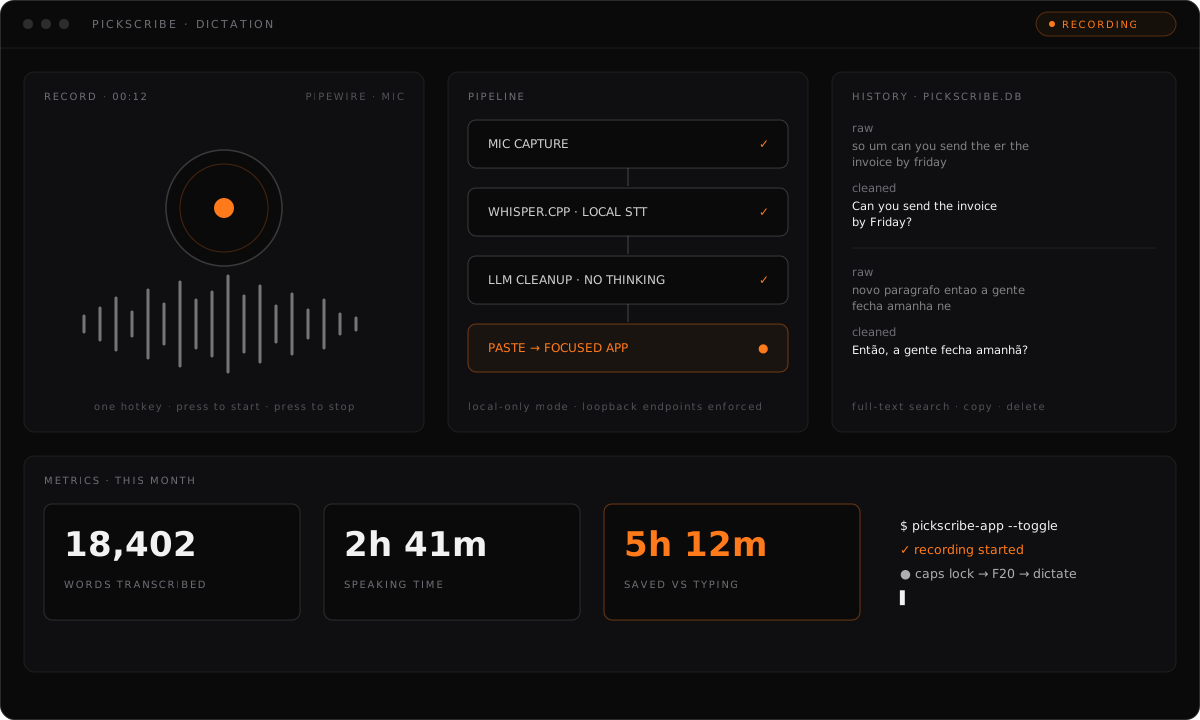
How PickScribe works
PickScribe records your microphone, transcribes speech locally with whisper.cpp, cleans the transcript with an OpenAI-compatible LLM provider, and pastes the final text into the focused app. One hotkey to start, the same hotkey to stop. The desktop app wraps the pipeline with a tray, a floating waveform button, history, and metrics.
Local transcription
whisper.cpp turns speech into text on your machine with a multilingual model. The audio never leaves the device.
Cleanup you control
An OpenAI-compatible provider tidies the transcript. Bring your own: DeepSeek, Ollama, LM Studio, or any /chat/completions endpoint.
Local-only mode
One switch guarantees no text leaves the machine. Only loopback cleanup endpoints are allowed, remote providers are blocked, and it falls back to the raw transcript.
Tray, waveform, history
A Tauri 2 app with a tray toggle, a floating live-waveform button that never steals focus, and every transcription stored locally in SQLite with full-text search.
Get PickScribe
Linux, KDE and Wayland first. Bundles a .deb and an .AppImage. Or build from source with Bun and a Rust toolchain.
Audio never leaves your machine. Only the transcribed text is sent for cleanup, and local-only mode keeps even that on the device by allowing loopback endpoints only.